Smart Home Electronics: Building Connected, Energy-Aware, and Secure Living Environments
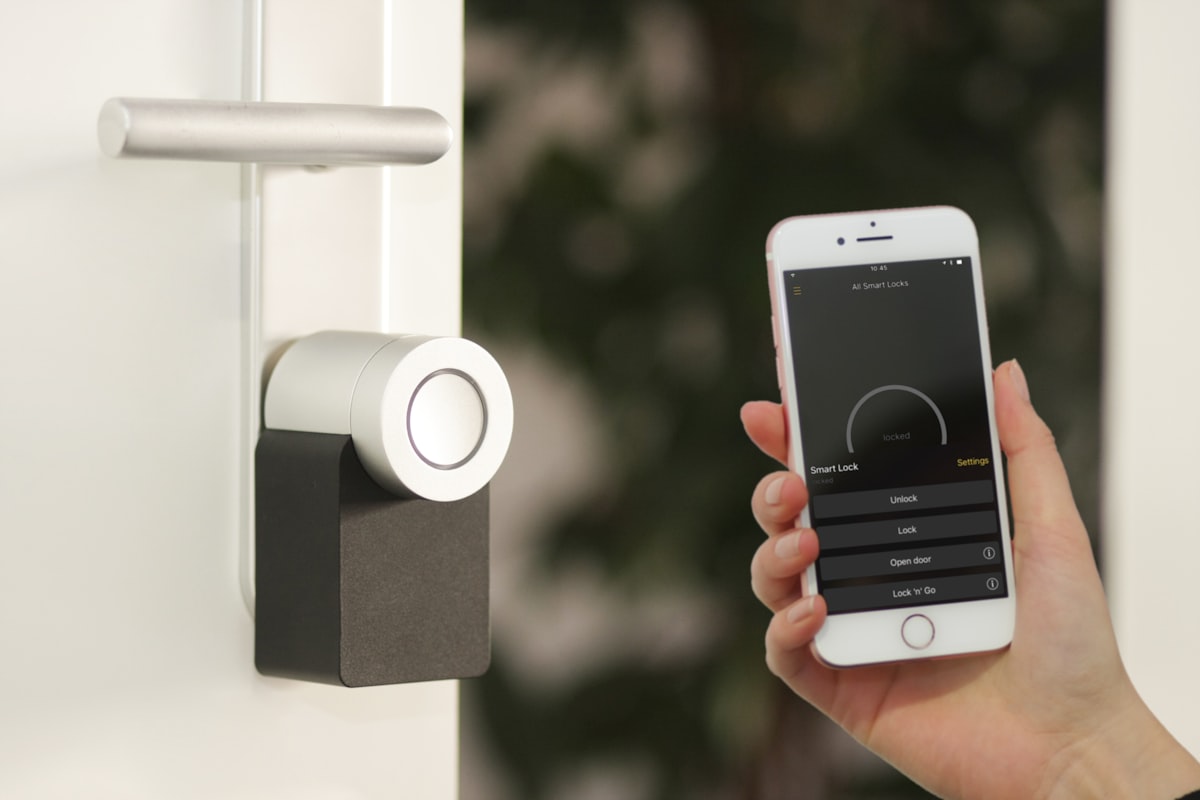
1. Understanding the Architecture of a Smart Home
Smart home systems operate through several interconnected layers. At the device level, sensors and electronic controllers collect information or perform physical actions. A motion sensor, for example, detects movement, while a smart switch controls an electrical circuit. A thermostat measures temperature and communicates with heating or cooling equipment.
The communication layer allows these devices to exchange information. Depending on the product, this may involve Wi-Fi, Ethernet, Thread, Zigbee, Z-Wave, Bluetooth, or another supported technology. A controller, hub, gateway, or compatible smart home platform coordinates device interactions and exposes controls through an application, voice assistant, or automation interface.
The software layer defines what happens when particular conditions occur. A simple automation might turn on a hallway light when a motion sensor detects activity after sunset. A more advanced routine could combine occupancy information, temperature readings, and user-defined schedules to adjust several devices.
These layers should not be confused with one another. A device can have wireless connectivity without supporting every smart home platform. Likewise, a compatible communication protocol does not guarantee that every advanced feature will be available through every controller.
Common communication technologies
| Technology | Typical Role | Advantages | Considerations |
|---|---|---|---|
| Wi-Fi | Smart cameras, appliances, speakers, and devices requiring network access. | Uses familiar home networking infrastructure and supports relatively high data rates. | Some devices consume more power than low-power sensor technologies and depend on adequate wireless coverage. |
| Ethernet | Network hubs, gateways, selected cameras, and stationary equipment. | Provides a wired connection that can offer predictable performance and avoid wireless interference. | Requires cabling and suitable network ports. |
| Zigbee | Low-power sensors, lighting controls, and compatible automation devices. | Supports low-power mesh networking in suitable installations. | Usually requires a compatible coordinator or hub, and interoperability depends on device profiles and implementation. |
| Z-Wave | Smart locks, sensors, switches, and other supported automation products. | Designed for low-power home automation and mesh communication. | Requires compatible controllers and region-appropriate radio-frequency support. |
| Thread | Low-power connected devices in supported smart home ecosystems. | Provides an IPv6-based mesh networking foundation designed for connected devices. | Some installations require a Thread border router to connect the Thread network with other IP networks. |
| Matter | Application-layer interoperability for compatible smart home products. | Helps certified devices communicate across supported ecosystems using a common standard. | Does not replace every wireless protocol or guarantee that every device feature is supported across all platforms. |
A practical distinction is that Wi-Fi, Ethernet, and Thread provide network connectivity, while Matter defines how compatible smart home devices communicate at the application level. Matter can operate over supported IP networking technologies, including Wi-Fi, Ethernet, and Thread. Zigbee and Z-Wave devices do not become Matter devices simply because they are connected to a smart home hub; compatibility may require a suitable bridge.
For homeowners, the implication is straightforward: check the actual device compatibility and required hub or controller before purchasing. A product advertised as supporting a particular wireless technology may not provide the same functionality across every smart home ecosystem.
2. Matter and the Challenge of Smart Home Interoperability
One of the longstanding problems in home automation has been ecosystem fragmentation. Different manufacturers have developed products that rely on different applications, communication methods, cloud services, and device-management systems. As a result, consumers have sometimes needed several hubs or separate applications to manage equipment in the same home.
Matter, developed through the Connectivity Standards Alliance, is designed to reduce this fragmentation by providing a common application-layer standard for compatible smart home devices. It aims to make it easier for products from different manufacturers to work within supported ecosystems.
Matter is an important development, but its capabilities should not be overstated. It does not mean that every device supports every feature, that every manufacturer's application becomes unnecessary, or that all connected equipment can communicate without a compatible controller. Device certification, supported device types, software versions, and platform implementation still matter.
Google's developer documentation describes Matter as an open smart home standard that provides a local connectivity path for supported devices. Apple's developer documentation similarly explains how Matter accessories can be commissioned and controlled through compatible Apple home technology.
The practical benefit is greater choice, not automatic perfection. Consumers should look for the official Matter certification mark and verify that the specific function they need is supported by their chosen platform.
3. Smart Energy Management: Beyond Remote Control
Energy management is one of the most meaningful applications of smart home electronics. Connected thermostats, lighting systems, occupancy sensors, smart plugs, and energy monitors can provide information that helps households understand when and how electricity is being used.
A smart device does not automatically reduce energy consumption. Its contribution depends on the equipment it controls, the automation rules, household behavior, and the way the system is configured. A smart light that remains switched on unnecessarily can consume more electricity than a conventional light that is used responsibly.
Smart thermostats and climate control
Smart thermostats can adjust temperature settings according to schedules, occupancy information, user preferences, or remote commands. Some models provide energy reports that help residents understand heating and cooling patterns.
ENERGY STAR's certification program is particularly useful when evaluating energy-saving claims. Certified smart thermostats must demonstrate savings using real-world customer data and defined evaluation criteria. The program's criteria include measurable reductions in heating and cooling system runtime, rather than relying only on advertised features.
However, thermostat savings should not be generalized to every household. Climate, building insulation, equipment efficiency, occupancy patterns, electricity prices, and user settings all influence the result. A thermostat designed for a central heating system may also be unsuitable for a different air-conditioning configuration.
Lighting and appliance management
Smart lighting can use schedules, occupancy sensors, and daylight conditions to reduce unnecessary operation. Smart plugs and energy-monitoring devices can help identify the electricity consumption of selected appliances.
These tools are most useful when they lead to a specific action. For example, a household may discover that an appliance remains in standby mode for long periods or that lighting is regularly left on in unoccupied rooms. Automation can then address the identified pattern.
Demand response and grid interaction
Some connected devices can participate in utility demand-response programs. In these arrangements, a participating thermostat or energy-management system may adjust selected settings during periods of high electricity demand, subject to the program's rules and user controls.
This capability can support electricity-system reliability, but participation is not automatically available everywhere. It depends on the utility, local regulations, equipment compatibility, and the availability of a suitable program. Consumers should also understand whether they can override automated adjustments.
For households in Indonesia, the practical starting point may be simpler than grid interaction: monitor major electricity loads, use efficient appliances, optimize air-conditioning settings, and automate lighting where it produces a clear benefit. Smart home technology should complement basic energy efficiency rather than replace it.
4. Cybersecurity: Every Connected Device Needs Protection
Connecting household equipment to a network introduces additional security responsibilities. Smart cameras, doorbells, locks, televisions, speakers, and appliances may collect data, communicate with cloud services, or provide remote access. If one device is poorly secured, it can create an opportunity for unauthorized access or expose information about household activities.
The Federal Trade Commission advises consumers to secure their home routers, change default administrative credentials, enable appropriate wireless encryption, install updates, and disconnect devices that are no longer needed. These basic measures are important because the router is a central point through which many household devices access the internet.
Practical security measures
- Secure the router first: Change default administrator credentials, use a strong Wi-Fi password, enable modern wireless security, and install router firmware updates.
- Use separate networks where appropriate: Place IoT devices on a guest network or a properly configured separate network when supported by the router. More advanced users can use VLANs and firewall rules to restrict communication between device groups.
- Replace default device passwords: Use unique credentials for accounts and devices that support individual authentication.
- Enable multi-factor authentication: Protect manufacturer accounts and applications that provide remote access to cameras, locks, and other sensitive devices.
- Keep firmware current: Install security updates and check whether the manufacturer continues to support the device.
- Disable unnecessary features: Turn off remote access, microphones, or other functions that are not required.
- Replace unsupported equipment: A device that no longer receives security updates may become an avoidable weak point in the home network.
Network segmentation can reduce the ability of a compromised device to communicate with sensitive equipment, but it is not a complete security solution. Poorly configured networks can also interfere with device discovery and automation. Homeowners should use the security features provided by their router and seek technical assistance before making complex network changes.
5. Privacy and the Importance of Local Processing
Smart home devices can reveal more than their immediate function suggests. Motion sensors may indicate when rooms are occupied, cameras can capture visitors, and connected appliances may generate usage patterns that reveal household routines.
This makes privacy an important part of product selection. Consumers should understand what information a device collects, whether it is transmitted to external servers, how long it is retained, and whether the manufacturer shares it with third parties.
Cloud-based and local-first systems
Cloud-based services can make remote access and advanced features easier to deliver. However, they may require household data to be transmitted to a service provider and can make some functions dependent on internet connectivity.
Local-first systems process selected commands and automation rules within the home network. This can reduce latency and limit the amount of information sent outside the home. Matter also supports local communication for compatible devices, although individual products may still rely on cloud services for certain functions.
Local processing should not be confused with complete privacy. A device may still send diagnostic information, account details, usage data, or other information to a manufacturer. Users should review product privacy documentation and distinguish between local control, local data storage, and cloud-based services.
Questions to ask before buying a connected device
- Does the device require a permanent cloud connection for basic operation?
- Can it continue to perform essential functions when the internet is unavailable?
- Does it collect audio, video, location, or household activity data?
- Can users review and delete stored information?
- How long will the manufacturer provide software and security updates?
- Can the device be reset and securely removed from the account when sold or discarded?
6. Reliability: What Happens When the Internet Goes Down?
A smart home should not become unusable whenever an internet connection fails. Yet some products depend heavily on cloud services for routine operation. If a manufacturer's server becomes unavailable, a connected device may lose remote access or certain automation features.
This creates an important distinction between internet connectivity and local functionality. A device may use the internet for remote control while still supporting basic operation through a local switch or controller. Another product may depend on a cloud account for nearly every function.
Before purchasing equipment, consumers should check which functions continue to work during an internet outage. Essential household controls, such as lighting, access mechanisms, and temperature management, should have practical alternatives where possible.
Reliability also depends on network design. A large home with thick walls, several floors, or many connected devices may need carefully placed access points or a suitable mesh network. Adding more devices without considering coverage, interference, and network capacity can make the system less reliable rather than more intelligent.
7. Edge AI and the Next Stage of Home Automation
Artificial intelligence is expanding the possibilities of home automation. Instead of relying exclusively on fixed schedules, future systems may combine information from sensors, appliance status, and user preferences to make more context-aware decisions.
Edge AI refers to processing that takes place close to where data is generated, often directly on a device or local gateway. In a smart home, this could support faster responses for selected tasks and reduce the need to send every piece of sensor data to remote servers.
Potential applications include more responsive occupancy detection, local analysis of selected camera events, adaptive energy management, and automation that responds to changing household conditions. However, these capabilities vary by product and should not be treated as universal features of current smart home systems.
More sophisticated automation also introduces a design challenge: systems must be predictable and easy to override. An algorithm that changes temperature settings, activates appliances, or modifies access controls without clear user understanding may create frustration or safety concerns.
The most useful AI-enabled home will not be the one that automates everything. It will be the one that makes appropriate decisions, explains important actions, respects user preferences, and provides straightforward manual control.
8. A Practical Framework for Building a Smart Home
A reliable smart home is best developed gradually. Rather than buying a large number of connected products at once, homeowners should begin with a specific problem and select technology that addresses it.
- Identify a clear objective. Decide whether the priority is energy monitoring, lighting automation, home security, accessibility, or convenience.
- Choose the main ecosystem carefully. Review the controller, application, supported devices, and long-term compatibility before committing to a platform.
- Check communication requirements. Confirm whether devices use Wi-Fi, Thread, Zigbee, Z-Wave, Matter, or a manufacturer-specific connection, and identify any required hub or bridge.
- Protect the home network. Secure the router, update connected equipment, use strong credentials, and configure network separation where appropriate.
- Test local operation. Check which important functions remain available during internet or cloud-service outages.
- Measure the results. Compare energy consumption, reliability, convenience, and maintenance requirements before expanding the system.
This approach avoids a common mistake in smart home adoption: purchasing devices because they are technologically impressive without establishing whether they solve a meaningful household problem.
Conclusion: Intelligence Should Make Homes More Dependable
Smart home electronics are transforming residential environments by connecting sensors, appliances, controllers, and software into coordinated systems. Standards such as Matter can improve interoperability, while energy-monitoring devices and smart controls can help households make better-informed decisions about electricity use.
However, connectivity alone does not guarantee efficiency, privacy, or reliability. Poorly secured devices can introduce cybersecurity risks, cloud-dependent products may lose functionality during outages, and automated energy savings depend on actual household conditions.
The next stage of smart home development should therefore prioritize compatibility, local resilience, transparent data practices, and user control. A genuinely intelligent home is not defined by how many devices it contains, but by how effectively its technology improves everyday life while remaining secure, understandable, and dependable.
References and Further Reading
- Connectivity Standards Alliance. Matter: The Foundation for Connected Things. https://csa-iot.org/all-solutions/matter/
- Connectivity Standards Alliance. Matter Frequently Asked Questions. https://csa-iot.org/all-solutions/matter/matter-faq/
- Google Home Developers. What Is Matter? https://developers.home.google.com/matter/overview
- Apple Developer Documentation. Matter. https://developer.apple.com/documentation/Matter
- U.S. Environmental Protection Agency and Department of Energy. ENERGY STAR: Smart Thermostats. https://www.energystar.gov/products/energy_star_home_upgrade/smart_thermostats
- U.S. Environmental Protection Agency and Department of Energy. Smart Thermostats: Key Product Criteria. https://www.energystar.gov/products/smart_thermostats/key_product_criteria
- Federal Trade Commission. Securing Your Internet-Connected Devices at Home. https://consumer.ftc.gov/articles/securing-your-internet-connected-devices-home
- Fagan, M., Megas, K., Watrobski, P., Marron, J., Cuthill, B., Lemire, D., Hoehn, B., & Evans, C. (2024). Recommended Cybersecurity Requirements for Consumer-Grade Router Products. NIST Interagency/Internal Report 8425A. https://doi.org/10.6028/NIST.IR.8425A
- Cyber Security Agency of Singapore. (2024). Protecting Your IoT Devices. https://www.csa.gov.sg/alerts-and-advisories/advisories/ad-2024-012/